
The insights gathered here are intended to broaden your perspective on assistive technologies, helping you make better decisions about the accessibility of your digital products.
Prejudice 1: Assistive technologies are only for blind people
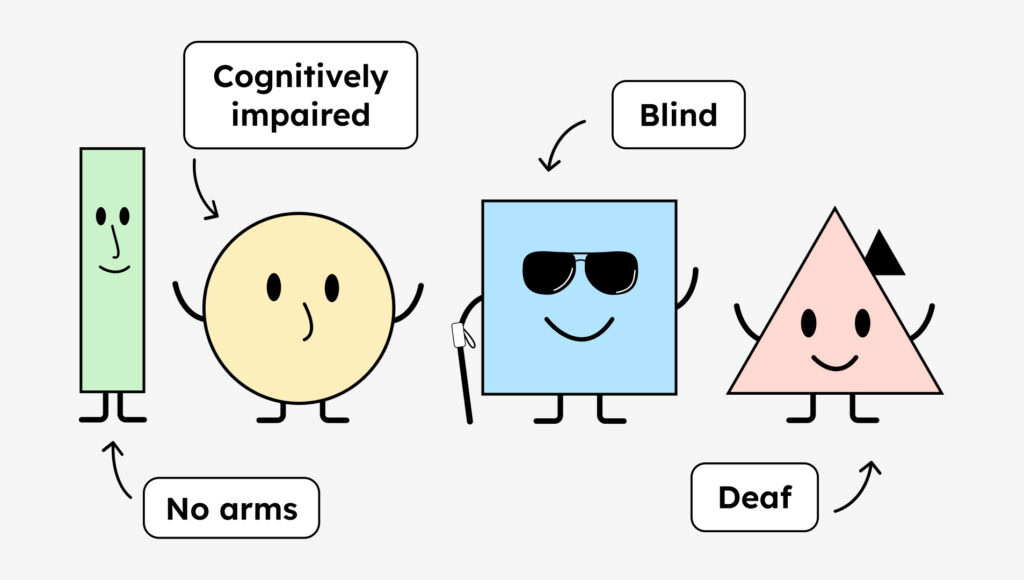
Blindness is the digital equivalent of a wheelchair. When people think about digital accessibility, they think of a blind person 90% of the time. However, many disabilities and impairments can make digital life more difficult.
For example, people with hearing impairments rely on captions, videos in sign language, and easy or simple language.
People with physical disabilities use assistive technologies such as voice control. Or they might use a simple switch that lets them perform a single action, such as a click. Therefore, among other things, all functions of your website should be operable by a single click. Hovering the mouse over something isn’t possible for everyone.
And there are people with cognitive impairments. These include, for example, autistic people, who, among other things, use their own pictogram language to better understand and communicate. But things like plain language and easy-to-read language, short forms for less cognitive load, and the omission of animations are also helpful for people with cognitive impairments (you can learn more about this below in the section on invisible disabilities). By the way, here’s a nice project by students from Austria: a calendar app for autistic people. Visit the Independo website.
That was all rather dry. To see assistive technologies in action, I recommend this YouTube playlist: [Link to YouTube playlist about assistive technologies].
Lesson learned: There is a wide variety of disabilities and assistive technologies that need to be taken into account.
Myth 2: A screen reader reads a website aloud.
This statement isn’t wrong, but it’s not entirely right either. A screen reader can read a website aloud to you. However, speech output is only one part of a screen reader’s functionality.
The screen reader itself is the software that gathers information from the browser/software. Speech output – that is, reading aloud – is just one feature. Reading is also possible with output via a Braille display. Blind people often use speech output and a Braille display in combination.
Learned: The main task of a screen reader is to understand your content. It can read the content aloud or also transmit it to hardware such as a Braille display.
Prejudice 3: Visually impaired means blind
A person is considered visually impaired if, even with aids like glasses or contact lenses, they can see no more than 30% of what a person with normal vision can see. Many people with visual impairments can still see to some extent, but often with great difficulty. Therefore, people with visual impairments are by far the larger group you should specifically consider when designing your website.
Therefore, you should also take care to choose accessible typography, ensure color contrast, and allow zooming on the website without obscuring text.
Here are our two articles for further reading on how to properly design accessible content:
What I learned: Visual impairment is a spectrum with many gradations. There are far more visually impaired than blind people.
Prejudice 4: Blind people have always been blind
I remember that clearly! Somehow, I was convinced that all blind people had simply always been blind. But that’s not true for the vast majority. Most people become blind over the course of their lives and therefore know quite well what it means to see. They can still vividly imagine things they’ve seen.
That’s why it’s important to write alt text for your images, even if the images only reflect your brand’s mood. Descriptions can greatly help blind people visualize and empathize with the images.
Lesson learned: Many blind people only become blind later in life.
Prejudice 5: People only have one disability
That took me a while to understand, too. It’s not uncommon for people to have more than one disability. A person can be both blind and hard of hearing, or hard of hearing and cognitively impaired, or…
A person might use multiple assistive technologies to navigate your website. This means you should test and support several assistive technologies (for example, voice control and screen readers).
Unfortunately, there are still often problems at the hardware level because some assistive technologies can’t be turned on or operated simultaneously. That’s not your problem, but it’s worth keeping in mind. And perhaps you’re a hardware-oriented developer and motivated to change that!
Lesson learned: People can have multiple disabilities.

Prejudice 6: Deaf people also have English as their mother tongue.
Sign language has its own grammar and is the native language of people who have been deaf their entire lives. Therefore, it is also helpful for this group if your website uses simple, easy-to-understand language.
You can read more about plain and easy-to-read language here: The article about the difference between plain and easy-to-read language.
Learned: Sign language is a language in its own right.
Prejudice 7: You can tell someone’s disability just by looking at them.
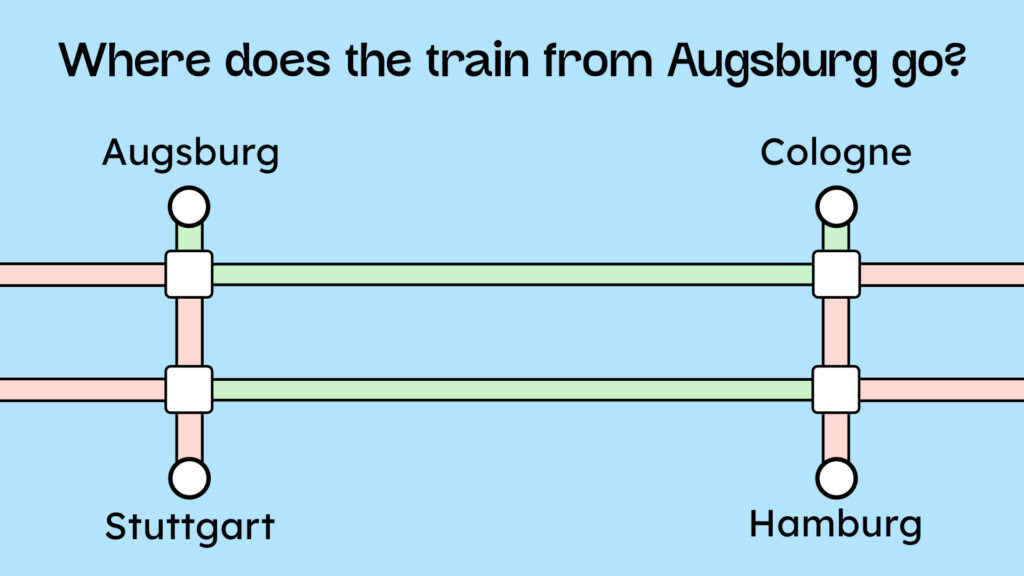
We often only believe what we see. This is particularly problematic when assessing impairments and disabilities. We can’t see every form of impairment. For example, we can’t tell whether someone is red-green colorblind or has epileptic seizures or migraines.
In the following example, approximately 10% of men cannot answer the question of where the train from Augsburg goes because the route network uses the colors red and green. Does it go to Cologne, Stuttgart, or Hamburg? (PS: The correct answer is Cologne).
The problem that strong animations on a website can actually trigger migraines is also often underestimated.
So there are limitations we don’t see but should always keep in mind if we want to create a good user experience for everyone.
Lesson learned: There is such a thing as invisible disability.
Prejudice 8: People always use the same assistive technology
Just because a blind person uses VoiceOver to have a website read aloud doesn’t mean they always or at all times use VoiceOver to accomplish their tasks. Perhaps they’re navigating a website with voice control while taking notes on their keyboard. Or perhaps they’re simply using the braille display to read your website while listening to a podcast or webinar.
Lesson learned: The use of assistive technologies is context-dependent.
Myth 9: Overlay tools are a solution to an unsolved problem.
I don’t even want to get into the problem that overlay tools don’t make a website accessible. That issue is already discussed quite frequently elsewhere. Here, I’d like to point out something that hardly anyone knows: Your operating system can already do almost everything an overlay tool can, and in some cases, even better.
You can configure quite a few things in your computer’s operating settings. You can adjust color contrast, font size, dark mode, and much more! We’ve compiled more information on how this works in the following article: [Link to article about operating system settings for accessibility].
Lesson learned: Your computer itself can provide significant accessibility.
Conclusion
I hope these small insights can open your eyes – as they did mine – in a few areas and give you a deeper understanding of how people use assistive technologies.
Only when we truly understand our users can we create digital experiences that are pleasant for everyone to use, bringing us closer to our goal with our digital products: No Excuses!
