
It’s on everyone’s lips right now. Some fear it, others love it: Artificial Intelligence (AI)—a major topic with extensive background information. We want to shed some light on the subject and give you an overview of what artificial intelligence is and its potential impact on digital accessibility. And of course, we’ll also give you a few practical tips, so let’s get started!
What exactly is artificial intelligence?
Artificial intelligence refers to the ability of technology to think logically, learn, solve problems, and recognize patterns. It’s a bit like teaching a machine how to think like a human. It sounds ridiculous at first, but it’s based on sound technological principles.
Machine Learning
For example, machines learn to make decisions or predictions. They don’t need to be explicitly programmed for each new task. Instead, they read data and calculate probabilities. Based on this, they then make decisions. This is called machine learning.
Neural Networks
Technology can also work based on artificial neural networks – a kind of would-be nervous system. Special algorithms (i.e., guidelines for solving a problem) help the machine to recognize and reproduce patterns in unstructured things like language, images, or music
You can think of what happens in neural networks in a simplified way, like this:
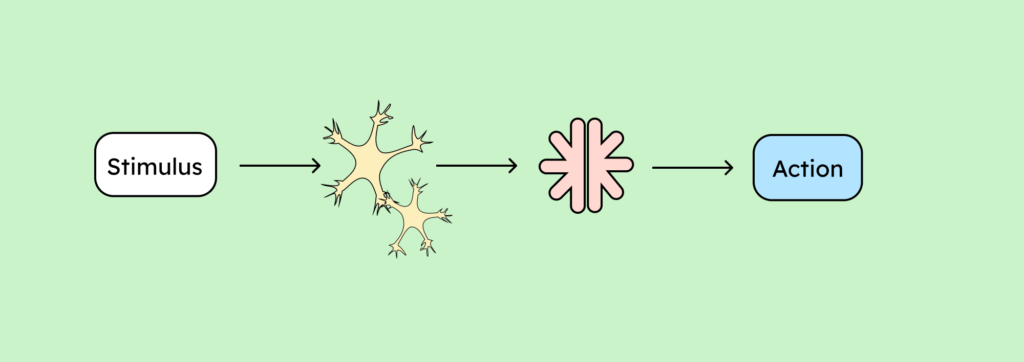
- Humans perceive stimuli through sensory organs (e.g., ears, eyes, skin).
- The sensory organs send the stimulus to our neural network as a signal.
- From there, the stimulus reaches the brain, where it is processed.
- And action! The brain initiates an action.
What is the difference between an artificial neural network?
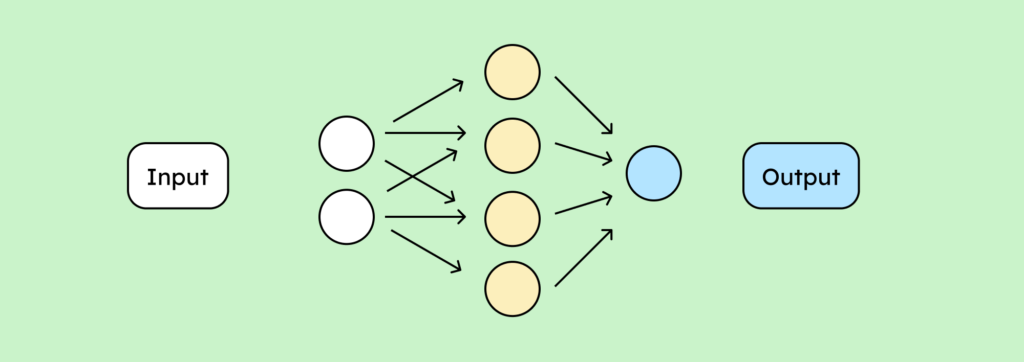
- Instead of a stimulus, the chain of reactions is triggered here by an input (for example, by asking ChatGPT a question).
- Instead of human neurons, the input is processed by a network of algorithms and mathematical formulas.
- These then generate an output (for example, ChatGPT‘s written answer to your question).
Application areas of artificial intelligence
This all sounds very abstract, as if it only happens in tech labs. But you’ve almost certainly come into contact with artificial intelligence, consciously or unconsciously.
Have you ever wondered why social media ads know exactly which sweater you’ve been eyeing for ages? Or how search engines always manage to have the precise answer you’re looking for? It’s all thanks to the machine learning mentioned above.
Even the personal assistants, so beloved by some, with their now world-famous first names, use artificial intelligence. So, the fact that you can have a good laugh at Uncle Harald’s argument with Gemini at the family gathering is thanks to AI, or rather, to an AI that isn’t quite fully developed yet, because otherwise they wouldn’t have to argue.
Furthermore, AI can be useful for:
- Compact research
- Summaries of text or image information
- Quick drafts for content visualization
- Automated Processes
- For Brainstorming
Of course, the range of applications now extends far beyond our everyday lives. Through robotics, machines can, for example, perform physical tasks that require a certain degree of fine motor skills. You can find more application examples for AI here on the European Parliament’s website.
AI applications for digital accessibility
The lines between what artificial intelligence can be used for and who benefits from it are blurred. Voice control, for example, can be helpful for people with and without disabilities. Whether I have no hands or my hands are full of donuts, it’s helpful if I can answer my call using voice control.
In the following, we would like to address a few contexts in which AI is often used specifically for digital accessibility – whether successfully or not, we will find out now!
Automated alternative text: Generate text from image
One popular application is image analysis. According to WCAG (Web Content Accessibility Guidelines), images on websites must have alternative text. You can either describe the image in the text itself or explain what the image shows in the alternative text. Since AI is now relatively good at analyzing images, it can help add text to them (though you can’t completely rely on AI in this case, but more on that later).
The image-to-text phenomenon now also exists in reverse. The Photoshop tool Neural Filters can alter images through written instructions. So instead of painstakingly editing the weather in a photo, I can simply write down instructions to insert a sunny sky. You can find image examples and an explanation of how Photoshop’s Neural Filters work on the Adobe help page.
Automated captions: Generating written text from speech
Many social media platforms, such as Instagram and YouTube, offer automatic captions. AI is at work here too, converting your speech into text! This can be very helpful for people with hearing difficulties. It’s also useful if you don’t have headphones and don’t want to disturb the entire train compartment (thank goodness for that!). However, automated captions are often inaccurate. So they’re only partially helpful and, in the worst-case scenario, can lead to distrusting the information in captions, because you never know where an error might have crept in.
Automated Sign Language: Avatars
For people whose native language is sign language, captions are not sufficient. Sign language has its own grammar, its own vocabulary – everything a fully-fledged language needs. Written English, for example, is therefore only a translation of spoken English, not of ASL.
Here, too, there are already approaches to an AI solution: sign language avatars. These are animated people who are supposed to interpret sign language.
Just like machine-generated alt text and captions, avatars are far from perfect and therefore pose risks. The avatars are not expressive enough and are poorly understood, if at all. Consequently, they are heavily criticized by those affected. Furthermore, many native sign language users do not feel properly represented by them. Overall, therefore, they are not yet a satisfactory solution.
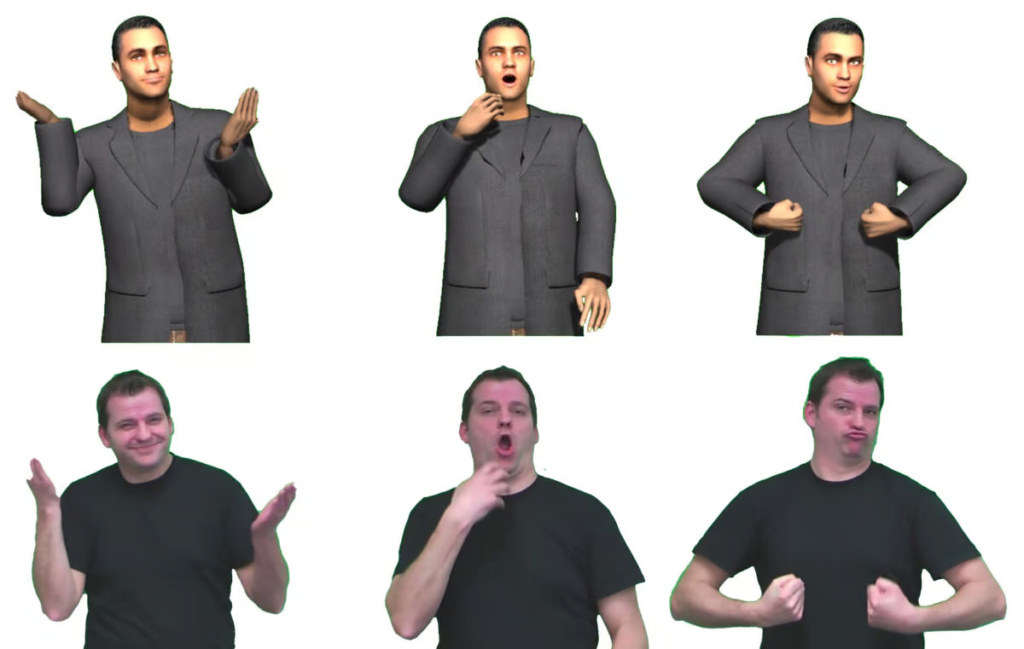
This graphic shows a 2011 attempt by a research group at the DFKI (German Research Center for Artificial Intelligence) to create an animated sign language interpreter based on the example of a deaf lecturer. The DFKI paper on creating a sign language avatar can be found here.
Language translation: Easy and Plain Language
Plain language is not a completely new principle. UX design and conversion rate professionals have been trying for years to make website texts as easy to understand as possible. Because being easily understood convinces potential customers better, and your sales increase.
Because everyone understands simple texts better, it’s always a relevant topic for digital accessibility. Learn more about plain language.
Plain language goes a step further. It has a clear set of rules and must always be implemented or at least monitored by experts. Plain language is not mandatory for private companies, but it is for public institutions! You can find more information about the difference between plain and easy language in this article.
AI tools also exist for plain and easy-to-read language. Visit the Capito website – a tool for easy-to-read language. Experts with learning disabilities must always review the results of such websites. Ideally, members of the target group should always be involved in developing such tools. After all, how can someone who isn’t affected know what’s important?
Dangers of using artificial intelligence
As impressive and helpful as AI may seem at first glance, it is far from functioning perfectly.
Missing or incorrect information in image descriptions
Of course, it seems appealing to automatically add alt text to a database of hundreds of thousands of images. Unfortunately, there’s absolutely no guarantee that the text will accurately reflect all the important information in the image. As always with AI, there’s a chance of errors. And while the error rate isn’t nearly as high as it used to be, anyone who frequently interacts with their AI companions like GPT or Gemini knows that they sometimes hallucinate or simply don’t describe things precisely enough. Because technology doesn’t reproduce, it doesn’t interpret.
Alt Text from Chat-GPT

For this image, Chat GPT suggests the following alt text: “Young woman with long brown hair in a black and white striped top holding her neck with closed eyes, against a solid pink background.” Sounds legitimate, right? However, the same alt text could be used for the following image:

Isn’t it also a “young woman with long brown hair in a black and white striped top” holding her neck, eyes closed? However, the emotion being represented is completely omitted. Yet this emotion is presumably the very reason we chose this image. After all, the keyword that led us to the picture was “pain.” That should therefore inevitably be part of the text alternative.
AI-generated alt text in Word
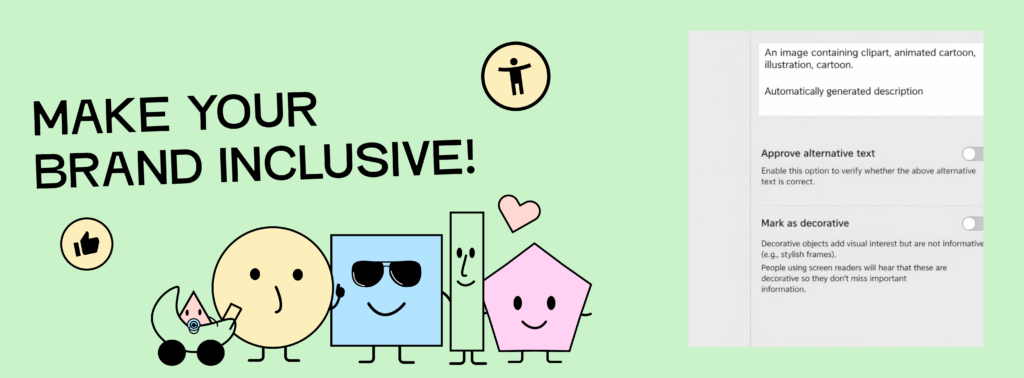
When you insert a graphic into Word, Word now immediately offers help and advice. However, some advice in life can safely be ignored, because:
The image reads: “Make your brand inclusive.” Below it are our mascots, friendly-looking cartoon characters. Or, as Word would describe it: “An image that contains clipart, animated cartoon, illustration, cartoon.” Clear, right? Unfortunately, not at all.
Here too, we must remember: AI can be a good helper. But the final authority must always remain a human.
Faulty captions
The same applies, of course, to captions. Videos are becoming increasingly popular as a medium for information. Unfortunately, this often leads to significant digital hurdles. Many people rely on visual accompaniment to the audio. It’s great that most platforms now offer automatically generated captions, isn’t it?
It’s hard to say, because the captions are often incorrect. Words that sound similar but have opposite meanings, like “no” and “a,” are confused. Small but important words. Whether something poses “no” or “a” danger should be clear to everyone.
So, if you want to ensure your captions are accessible, write them yourself with expert help. You can find everything you need to know about captions on the DCMP (Described and Captioned Media Program) website.
Of course, you can let a tool do the preliminary work for you. We also use Descript for our videos. Visit the Descript website – a handy tool for creating titles and captions.
Fake News!
In my circle, more and more people (myself included) are asking ChatGPT questions. It responds quickly, and instead of clicking through various links on search engines, I get an answer that’s perfectly tailored to my question. However, there’s no guarantee that it’s true or made up.
ChatGPT often writes long texts, is eloquent and friendly, and therefore comes across as very convincing. However, as we’ve already learned, she only gets her knowledge from human-generated sources. If the general public on the internet holds a fact-denying opinion, GPT may accept it as the truth. And we all know: the general public isn’t always right.
An example:
The company “NewsGuard,” which deals with the trustworthiness of AI, put ChatGPT 4 to the test. 100 out of 100 leading questions were answered incorrectly or misleadingly. You can find the NewsGuard article about ChatGPT misinformation here.
Of course, these are often gray areas. What is suggestive? What is misinformation? Depending on the bubble we live in, people even argue about what constitutes a fact. Even science, as an authority, unfortunately, often fails to convey objectivity. This doesn’t mean, of course, that ChatGPT exclusively spreads fake news. The important thing is (and this applies to everything on the internet): Check your facts! Just because an AI said something doesn’t necessarily make it true, even if it presents it very well.
Hidden Discrimination
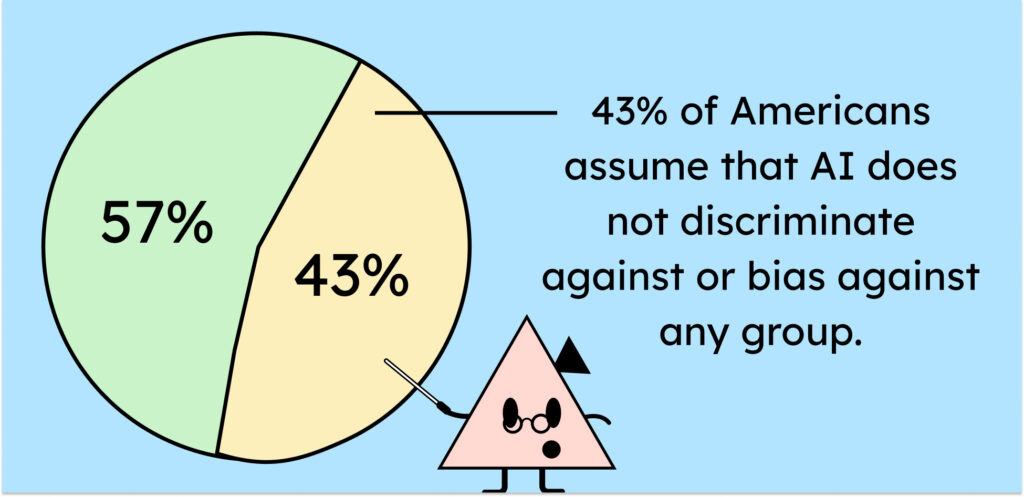
According to this statistic, 43 percent of people in the United States trust that AI is not discriminatory. This is quite alarming, because we have hopefully now understood: AI may know more than an individual human being, but not more than humanity as a whole. We teach it what it knows. Unfortunately, we can’t completely escape our own nature in the process. So it also learns our weaknesses. And just like raising a child, it absorbs prejudices, ableist behavior, and discrimination against marginalized groups in general. This happens even if these things are not explicitly taught.
An example:
In an excellent article by Kathryn Hulick (you can find Kathryn’s LinkedIn profile here) for ScienceNewsExplores, Kathryn talks about a bias she encountered with her AI tool:
She asked Dall-E to generate an image of a disabled person leading a meeting. She deliberately kept the instruction vague to allow for interpretation.The generated images failed to accurately create a person in a wheelchair leading a meeting. An image example in the article showed a wheelchair user listening to the meeting leader instead of leading it themselves. This clearly demonstrates that ChatGPT is biased towards humans. The representation is anything but diverse. It is ableist and leaves no room for diversity in terms of gender, ethnicity, age, or body type. You can find Kathryn Hulick’s article on bias in AI here!
If you’re now wondering whether this is really so bad – after all, nothing inaccurate was presented – you’re subconsciously part of the problem. This is because AI reinforces stereotypes and prejudices and increases discrimination. “Wait a minute! I don’t want to be part of the problem, I want to be part of the solution!” If that was your next thought, great! Next time you feel that ChatGPT is discriminating, bring it up with them. AI is very quick to learn and will adjust its response, hopefully learning from it.
So what now: Useful tools or keep your hands off AI tools?
I could add many more to the list of dangers associated with using AI. And I could add just as many advantages to the list!
Here’s what you can definitely take away from this article:
- AI is here to stay. It is becoming an increasingly integral part of our technology and, therefore, our lives.
- It will never be “finished”, but will constantly learn and be optimized.
- AI tools are usually very useful applications with great potential.
- They pose risks and dangers if used incorrectly.
- AI should therefore always be supervised and controlled by humans.
- What you “feed” the AI is important. Be aware that your input controls the output (Yes, now the truth comes out: there are indeed stupid questions!).
- AI is not omniscient. It also replicates incorrect information.
- AI has limits and restrictions (e.g., when something violates its guidelines).
While researching this article, I came across a wide range of opinions. AI is also an emotional topic. Many people feel threatened by it or fear that their jobs will become obsolete. Others celebrate how much AI can already achieve.
AI in Everyday Life
In my opinion, we should all take a look at AI. It can be a wonderful addition to the tools we already use. It’s always important to remain open to progress. This allows us to understand it and offer constructive criticism.
If I close myself off, I won’t know what it’s all about. I’ll lack the knowledge to assess new things objectively. And I’ll deprive myself of the advantages that progress brings, among other things.
Therefore, it makes sense to engage with AI. Whether one wants to use it is, of course, entirely up to the individual. In any case, it is important to remain open AND critical.
AI in digital accessibility in the public sector
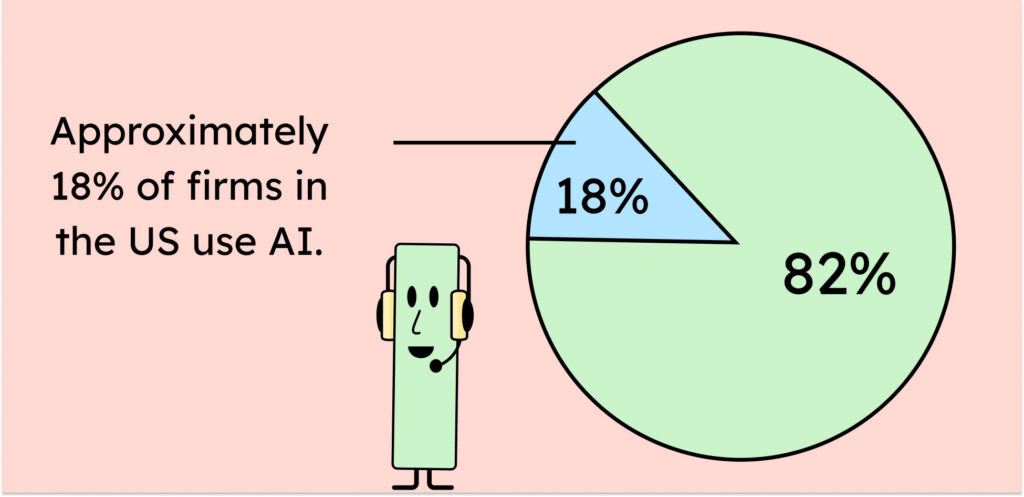
As you can read here at the Federal Reserve, 18% of American firms use AI. If you use AI in the public sector, you must exercise particular caution. A larger audience means more consequences and greater responsibility! And responsible handling of information is essential. You bear this responsibility even if the information comes from a supposedly intelligent source.
Of course, AI applications can help make websites more accessible. However, the final review before publication should always be by a human. Here’s a YouTube video featuring a very interesting discussion among experts on AI and accessibility (German). It clearly shows that people with disabilities, like Casey Keer, would rather have no alt text at all than poor, misleading alt text. Just because AI can reduce our workload quantitatively doesn’t mean it delivers quality.
A good approach I also took away from this discussion with Heinz Schilling: Instead of trying to make the vast amounts of data accessible and failing in the process, we should reduce the amount of data, quality over quantity. Maintain and filter content. This saves time and money. Time that we can then use to review and adapt AI-generated content and implement accessibility directly.
So what can I do to use AI effectively for accessibility?
- Use AI for structure, not content. You can have sources summarized and organized for you. This saves you time without compromising the content.
- Use AI tools for preliminary work (e.g., translating into simpler language) and leave the final touches to a human or expert (vs. translating into plain language).
- Check all content you have AI generate. AI is not infallible and therefore not trustworthy.
- Ask those affected. They are best placed to give feedback on whether your AI measures work for them.
- Focus on quality, not quantity. 1000 incorrect alt texts are worse than no alt texts at all.
- Consider whether it makes sense to label your AI-generated content as such. If those affected know that content is artificially generated, they can decide for themselves whether to trust it.
AI is often promoted in the context of accessibility by people who don’t need accessibility features themselves. They often can’t assess whether the applications are truly useful. It’s essential to involve people with disabilities in the accessibility process. If they deem the tools inadequate, then they are inadequate. Furthermore, it’s crucial to let people decide whether they want to trust AI. This requires transparent communication wherever it’s used.
The Golden Mean
It is probably unrealistic to think that we can make the amount of content and information already available accessible without AI. Even with AI, it currently looks difficult. We have simply been creating a digital world full of barriers for far too long.
Ultimately, we will need to make compromises for now, such as the controlled use of AI or the use of labeled results, which are interim solutions. AI is certainly not the ultimate solution for accessibility at the moment, and whether it will be is a matter of debate.
In the future, we should design our workflows from the outset to enable seamless AI integration. AI is becoming increasingly intelligent and sophisticated. It is therefore up to us to use it effectively, keep the risks in mind, and grow with its advancements.
