
WCAG 2.5.3: Label in Name
Back to all WCAG criteriaOVERVIEW
What's it about?
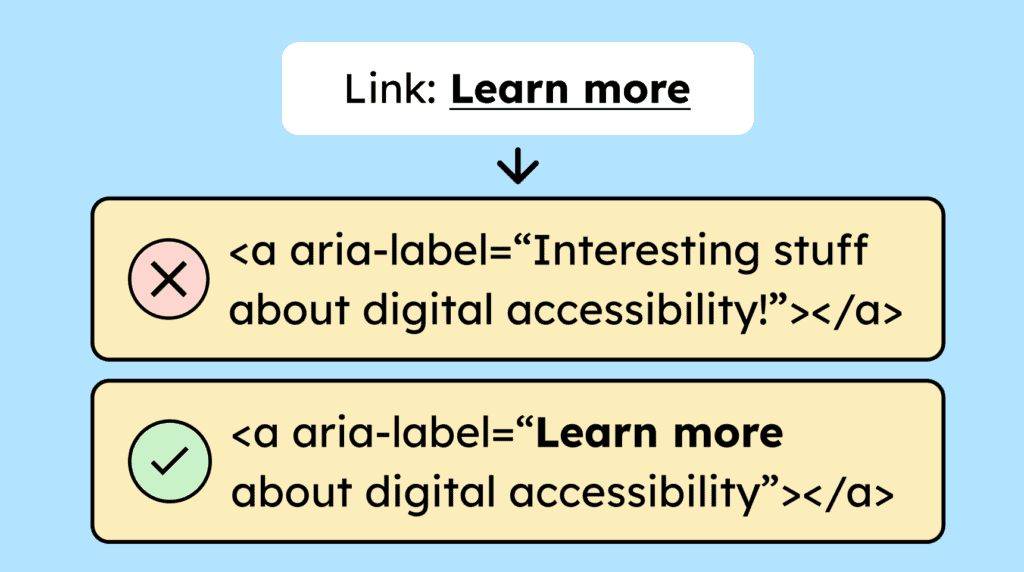
If the visible text of a control, whether a link, button, or form field, is expanded or further described in its accessible name, the visible text must be fully included.
This is especially important for people who use voice control. They need to be able to refer to the element exactly as it is visually labeled for the interaction to work.
How to
Depending on your situation, you can implement one of the following options to meet the criterion. For a deeper dive, please refer to the linked WCAG techniques.
Visible text is part of the accessible name
Sometimes you may want to make links or buttons clearer for screen reader users by extending the accessible name.
Example: product cards with buttons labeled “View product.” A screen reader user can generate a list of all interactive elements. In that list, it would not be clear which product each button refers to if they all simply say “View product.”
One solution: extend the accessible name using an aria-label without changing the visible text.
<a aria-label=”View product E-Learning for Design”>View product</a>The screen reader will now read: “View product E-Learning for Design,” while the visible text remains “View product.”
Important: The visible text must be fully included in the accessible name. Otherwise, people who use voice control cannot activate the button by its name. Voice control reacts to the accessible name, not the visual text.


- Recommendation!
Visible and accessible name are the same
The simplest technique: make sure that the visible text and accessible name are always identical. In most cases, it is best to put the full text directly into the link:
<a href=”…”>Read more about accessibility</a>
This completely avoids the problem and also saves you maintenance effort in the future. In addition, it reduces potential errors and makes the link immediately understandable for all users.

Notes
Hint: Hidden text
Instead of extending the text with an aria-label, you can also hide parts of the text via CSS:
<a href=”produkt.html”>Learn more <span class=”visually-hidden”>about the product E-Learning for Design</span></a>
The class .visually-hidden hides the text visually. The code for it:
.visually-hidden {
position: absolute !important;
inline-size: 1px !important;
block-size: 1px !important;
padding: 0;
margin: -1px;
overflow: hidden;
clip-path: rect(0, 0, 0, 0);
white-space: nowrap;
border: 0;
}
This is better than using ARIA for the following reasons:
-
The text exists in the HTML and is captured by translation tools.
-
Repetitions (like “Learn more”) at the beginning of every aria-label are avoided.
-
Easier maintenance because all text is in one place (in the markup).
-

Accessible development?
Our workshop for developers!
Learn everything you need to know in our workshop to build accessible websites!

Learn accessibility with us?
Looking to implement WCAG best practices in your design, development, or content workflow? Book a workshop for your team or contact us directly to learn more.