
WCAG 2.4.1: Bypass Blocks
Back to all WCAG criteriaOVERVIEW
What's it about?
On a website, it must be possible to skip repeating regions.
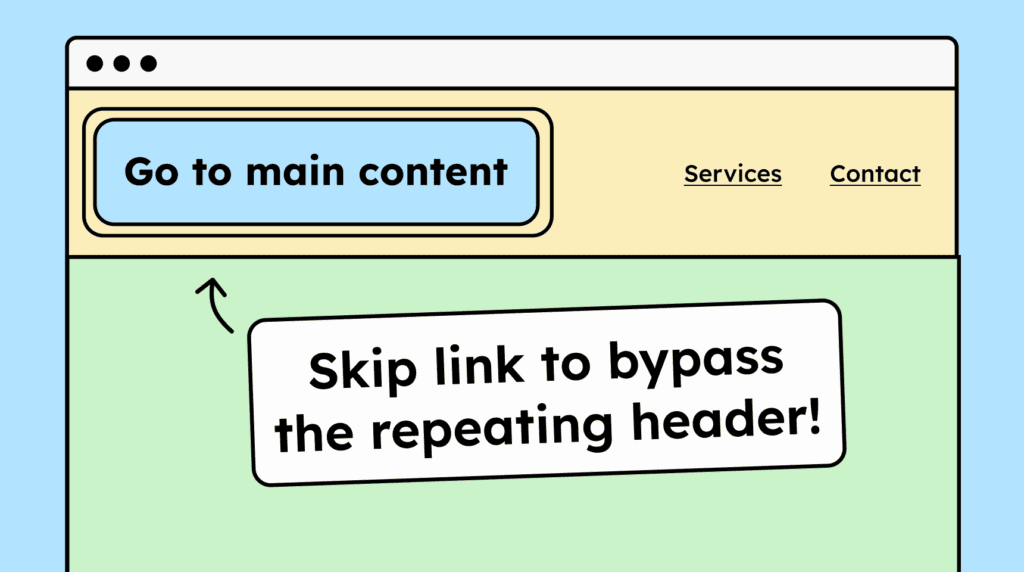
A repeating region is, for example, the header. The header appears on every subpage of the website. People who navigate using the keyboard or assistive technologies would otherwise have to tab through the entire header again on every page if it cannot be skipped.
How to
Depending on your situation, you can implement one of the following options to meet the criterion. For a deeper dive, please refer to the linked WCAG techniques.
- Recommendation!
Skip links
At the very top of the page, there should be skip links to important areas such as the main content (<main>).
The link to the main content should be the first operable element. It is normally hidden and becomes visible only when navigating with the keyboard. We strongly recommend this technique. The two alternative techniques are considered only “accessibility-supported” by some auditors and may be rated lower.
Don’t overdo it with skip links. One link to the main content is great, a second one to the footer is okay. For any additional skip links, consider whether they are truly helpful and necessary.
Important: When activating the skip link, the keyboard focus must also be moved. Otherwise, the next press of [TAB] will return the user to the top of the page.


ARIA landmarks
Use ARIA landmarks to clearly identify different areas of the page. Common roles include navigation, main, search, banner, contentinfo, and region.
If you use landmarks such as navigation more than once, you should give them an additional name (for example, using aria-label or aria-labelledby). This makes it clear to screen reader users which navigation they are currently interacting with.

Heading structure
Structure the page with logically organized headings (h2 below h1, h3 below h2, etc.).
Headings help screen reader users navigate using keyboard shortcuts and skip sections. Without a screen reader, this is of course not as simple, which is why it’s recommended not to rely on this technique alone.
Technique(s):
- WCAG does not list a technique for this.

Accessible development?
Our workshop for developers!
Learn everything you need to know in our workshop to build accessible websites!

Learn accessibility with us?
Looking to implement WCAG best practices in your design, development, or content workflow? Book a workshop for your team or contact us directly to learn more.